

Customer relationship management (CRM) systems are at the center of how modern businesses manage customer information and interactions. Today, more companies than ever rely on CRM software to track leads, follow up on opportunities, coordinate service work, and keep data consistent across teams.
The importance of CRM is reflected in its rapid growth: the global CRM market is expected to increase from USD 112.91 billion in 2025 to USD 262.74 billion by 2032. This rise shows that organizations are investing more in systems that help them stay organized, responsive, and customer‑focused.
However, building the right CRM is not simple. In this blog, we will explain what CRM software is, how custom CRMs are built, and the entire customer relationship management software development process.
Overview
- CRM centralizes customer data, tracks interactions, and automates tasks to improve visibility and operational efficiency.
- Core CRM functions connect sales, marketing, service, and reporting, ensuring workflows and data align across teams.
- Custom CRMs are built with explicit data models, API/event-driven logic, role-based access, and multi-tenant options for scalability.
- Building a CRM requires phased development: discovery, architecture, UX, core features, integrations, testing, deployment, and optimization.
- Custom CRMs offer flexibility, native integrations, control, and long-term scalability, while platform CRMs may impose limits and hidden risks.
What Is CRM Software?
CRM software is a system that centralizes all your customer information, interactions, and transactions in one structured platform. It tracks leads, opportunities, communications, purchases, and support requests across teams, ensuring consistency in follow-ups and reporting.
Additionally, since it captures operational data in real time, it allows businesses to monitor pipelines, forecast revenue, measure engagement, and automate repetitive tasks while maintaining a clear view of customer relationships and outcomes.
Now that we understand what CRM does, let’s explore how its core modules interconnect, ensuring data, workflows, and reporting reinforce each other across teams effectively.
Also Read: Top 7 Progressive Web App Frameworks & Tools to Watch For in 2026
Core Functional Scope of a CRM System
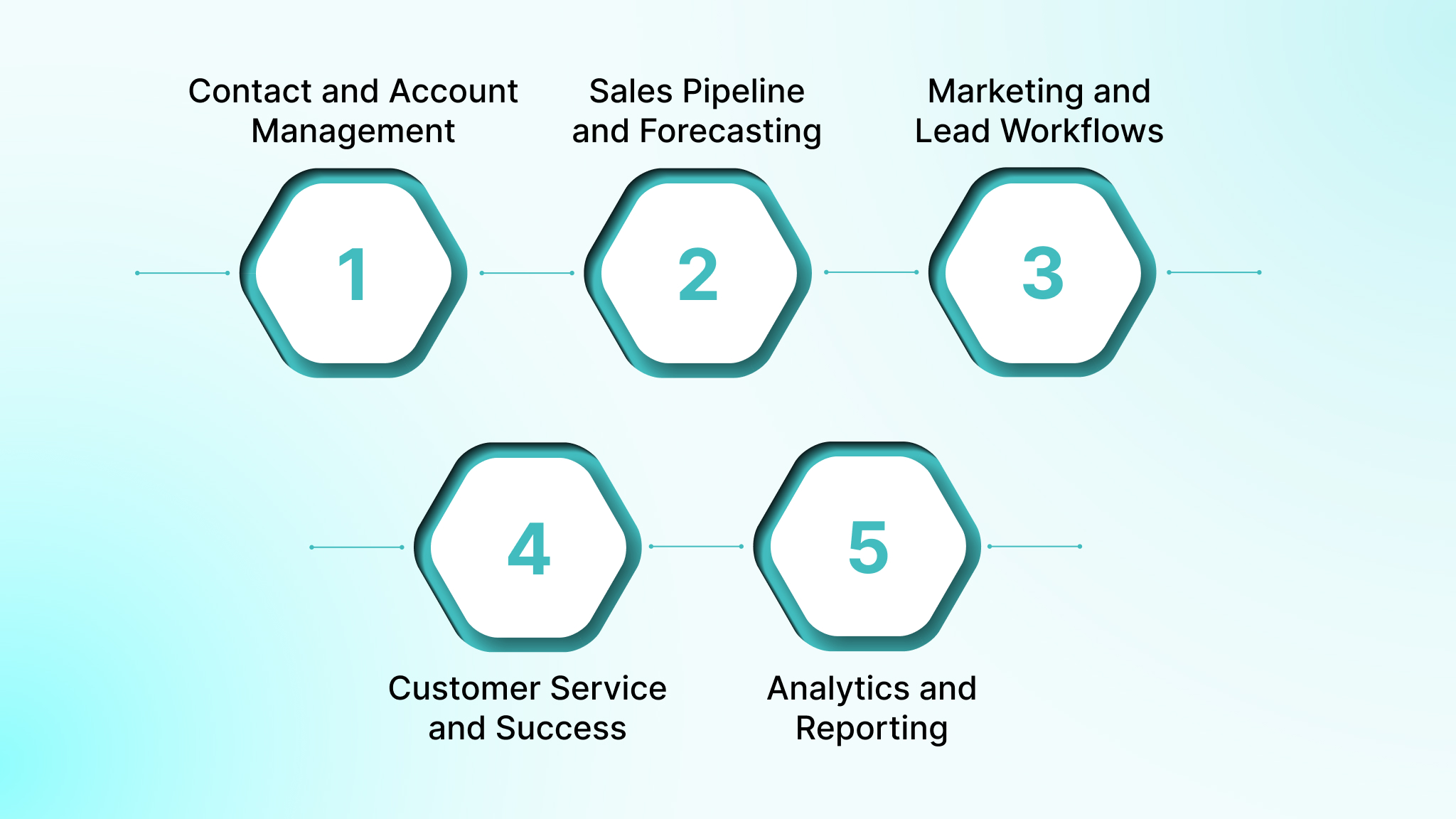
A well-built CRM is a unified system, not a patchwork of features. Every module is designed to reflect your operational realities, ensuring data, workflows, and reporting connect seamlessly across teams. Below, we see how each function interlocks in practice and serves measurable business outcomes:
- Contact and Account Management: Model hierarchical relationships between accounts, subsidiaries, buying committees, and partners, not just flat attributes. Include role-specific access controls.
- Sales Pipeline and Forecasting: Map conditional stage transitions, multi-quote approvals, and finance or legal dependencies. Forecast using historical deal velocity, product mix, and win rates.
- Marketing and Lead Workflows: Tie inbound leads to campaign attribution, product usage events, and partner referrals. Implement automated scoring, routing, and follow-ups based on lead source type.
- Customer Service and Success: Track onboarding milestones, renewal risk, support tickets, escalation paths, and expansion opportunities in a single operational view.
- Analytics and Reporting: Build decision-focused dashboards, revenue by product line, SLA breaches, pipeline-to-cash reconciliation, directly from the CRM’s data model, ensuring accuracy.
Having covered core CRM functions, the next step is understanding the system’s architecture, including data models, event-driven logic, and multi-tenant considerations that enable scalability.
How CRM Systems Are Built?
CRMs are the backbone of modern business operations, connecting sales, marketing, and customer success workflows. Let’s explore how these systems are structured to ensure performance, flexibility, and scalability.
1. Data Models
Define explicit entities and relationships: accounts, contacts, deals, activities, and domain-specific objects with lifecycle rules. This ensures your CRM handles billing, renewals, and reporting without costly schema changes.
2. API-First vs Event-Driven Design
Use API-first for synchronous actions like UI updates, forms, and service calls. Implement event-driven workflows for asynchronous processes to maintain consistent data across your CRM modules.
3. Role-Based Access Control
Set granular, role-based permissions so your team sees only what’s necessary. This protects sensitive data, simplifies audits, and keeps your CRM compliant with industry regulations.
4. Multi-Tenant vs Single-Tenant
Decide between multi-tenant for shared infrastructure with isolated data or single-tenant for full separation. Your choice will shape database design, deployments, backups, and compliance workflows.
5. Scalability Considerations
Plan indexing, caching, background jobs, and partitioned queues early. This ensures your CRM can grow with data volume, complex reporting, and high integration demands without performance bottlenecks.
With architecture defined, let’s walk through a practical step-by-step development process for a successful CRM development in 2026.
Step-by-Step CRM Development Process
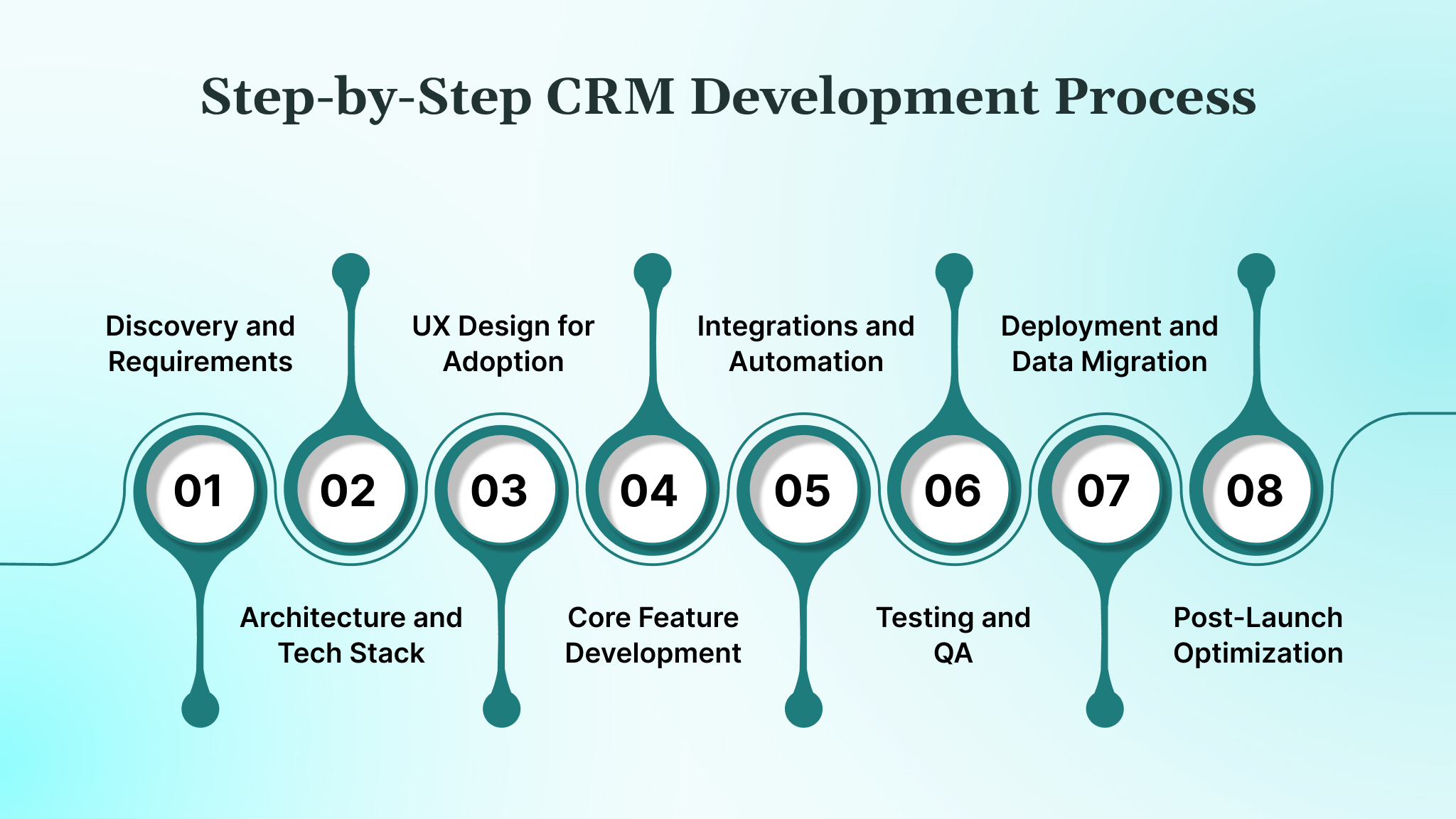
Building a CRM is a phased, iterative engineering effort, where each stage validates workflows, integrations, and feature priorities. This section explains discovery, architecture, UX, core functionality, integrations, testing, deployment, and post-launch optimization for real-world adoption.
1. Discovery and Requirements
Discovery lays the groundwork for a custom CRM, identifying real workflows, integration points, and business bottlenecks. This phase ensures development aligns with operational realities, measurable goals, and the organization’s unique sales, marketing, and support processes.
How to approach discovery effectively:
- Map your department workflows, noting approvals, handoffs, and conditional steps to reflect how your teams actually operate.
- Interview stakeholders in sales, support, marketing, and finance to uncover hidden pain points and operational dependencies.
- Audit existing systems and data flows to identify duplication, errors, or gaps that could affect your CRM.
- Define your success metrics, like cutting lead response time or automating repetitive updates, to measure real efficiency gains.
- Prioritize features by impact and complexity so your MVP addresses the most critical operational needs first.
2. Architecture and Tech Stack
Architecture determines how your CRM scales, integrates, and adapts to business growth. Choosing the right frameworks, databases, and infrastructure ensures performance, reliability, and maintainability while supporting complex workflows and real-time data processing.
How to design architecture effectively:
- Select backend frameworks and databases aligned with transaction volume, reporting complexity, and multi-tenant or single-tenant requirements.
- Choose API-first, event-driven, or hybrid architectures to balance synchronous UI actions and asynchronous background workflows.
- Plan CI/CD pipelines and automated deployment to enable iterative releases with minimal downtime.
- Define your integration patterns with ERP, billing, and analytics systems to maintain data consistency and reduce reconciliation errors.
- Implement monitoring, logging, and alerting from day one to detect performance bottlenecks or system failures early.
3. UX Design for Adoption
User experience drives adoption, productivity, and satisfaction. Designing interfaces tailored to roles and workflows reduces cognitive load, boosts onboarding, and ensures teams engage with the CRM rather than bypass it.
How to optimize UX:
- Build role-based dashboards displaying only actionable data and tasks relevant to each user type.
- Prototype workflows with clickable mockups and validate efficiency through user testing before CRM coding.
- Integrate contextual guidance, inline validation, and tooltips to minimize training requirements.
- Ensure mobile, remote, and multi-device access to support field teams and distributed offices.
- Conduct iterative usability testing with real users to identify friction points and refine navigation patterns.
4. Core Feature Development
Core features define your CRM’s operational value. Focus on the minimal functionality that enables daily work, stabilizes workflows, and sets the foundation for advanced capabilities.
How to build core features:
- Implement essential objects, pipelines, and automation rules for lead, deal, and account management.
- Configure conditional workflows, approvals, and field dependencies reflecting real business logic.
- Introduce advanced modules, like predictive scoring or usage-based billing, incrementally after core flows stabilize.
- Validate each feature against real-world scenarios using test datasets from historical operations.
- Use feature flags to deploy advanced functionality gradually without disrupting active users.
5. Integrations and Automation
Seamless integration determines your CRM reliability and efficiency. Early connection to ERP, billing, and analytics systems ensures data consistency, while automation eliminates repetitive tasks and reduces human error.
How to manage integrations and automation:
- Integrate ERP, accounting, and billing platforms early to synchronize customer, invoice, and payment data in real-time.
- Connect marketing automation and analytics platforms to capture campaign attribution and lead lifecycle data.
- Automate repetitive actions like lead scoring, opportunity routing, and SLA alerts for efficiency.
- Implement event-driven syncs to maintain near-real-time data consistency and avoid batch overwrite errors.
- Monitor integration failures and set up alerting to resolve errors before they impact users.
6. Testing and QA
Testing is essential to validate functionality, performance, and compliance. Structured QA ensures modules work individually, together, and under real-world load, producing a reliable system ready for deployment.
How to test effectively:
- Conduct unit testing for each module, such as contact management, deal tracking, and automated lead routing.
- Perform integration testing to verify workflows across modules, e.g., lead conversion triggers revenue updates.
- Run user acceptance testing (UAT) with real users performing day-to-day tasks to identify usability issues.
- Execute performance tests under high data volume, multi-user load, and complex reporting scenarios.
- Assess security and compliance through vulnerability scanning, role-based access validation, and audit readiness checks.
7. Deployment and Data Migration
Deployment ensures your CRM is production-ready while preserving operational continuity. Properly planned data migration prevents loss, errors, or downtime.
How to deploy and migrate data:
- Clean and transform legacy data before migration, removing duplicates and standardizing formats.
- Migrate data in phases with parallel runs to minimize operational disruption.
- Validate migrated data against source systems to ensure accuracy and integrity.
- Configure system monitoring and rollback plans to handle unexpected issues during deployment.
- Train admins and power users on system setup, backups, and emergency procedures.
8. Post-Launch Optimization
Post-launch optimization ensures your CRM scales with real usage, maximizes adoption, and supports continuous business improvements.
How to optimize post-launch:
- Analyze usage patterns and workflow adherence to identify underutilized features or bottlenecks.
- Gather feedback from end-users to refine interfaces, dashboards, and automated workflows.
- Iterate on feature enhancements, removing unused modules to reduce complexity and maintenance overhead.
- Monitor integration performance and adjust automation rules to maintain accuracy.
- Schedule regular updates and review metrics like task completion rates, pipeline velocity, and SLA compliance.
After detailing the development journey, we must compare custom and platform CRMs, evaluating flexibility, costs, integrations, control, scalability, and operational risks.
Also Read: Online Payment Gateway Integration: A Step-by-Step Guide for 2026
Custom CRM vs Platform-Based CRM
Custom CRMs are engineered for your unique business workflows, data models, and operational dependencies, while platform CRMs provide prebuilt functionality. Here, we evaluate flexibility, costs, integrations, ownership, scalability, and operational risks to guide your CRM strategy.
1. Flexibility
Custom CRMs allow conditional pipelines, multi-stage approvals, and complex cross-team workflows. Platform CRMs only support predefined stages and automation rules, limiting adaptation for non-standard sales, marketing, or service operations.
2. Cost Over Time
Custom CRMs require a higher upfront investment but reduce long-term subscription fees, middleware, and workarounds. Platform CRMs often accumulate recurring licensing, integration add-ons, and overage costs as teams and data volume grow.
3. Time to Value
Platform CRMs can launch in weeks for standard processes. Custom CRMs may take months but deliver higher efficiency and measurable ROI in complex workflows, multi-entity accounts, and non-linear sales cycles.
4. Integrations
Custom CRMs natively connect ERP, billing, analytics, POS, and partner systems using API-first or event-driven design. Platform CRMs often require fragile middleware, batch syncs, or manual reconciliation, increasing errors and latency.
5. Control & Ownership
Custom CRMs provide full control over data models, feature prioritization, and release cycles. Platform CRMs restrict modifications, lock workflows into vendor templates, and force compliance with vendor update schedules.
6. Scalability
Custom CRMs scale horizontally and vertically for multi-region data, growing user bases, high transaction volume, and reporting complexity. Platform CRMs risk database limitations, throttled API calls, or user-based licensing ceilings under heavy load.
7. Risks
Custom CRMs carry engineering, maintenance, and adoption risks, mitigated through staged rollout, automated testing, and robust monitoring. Platform CRMs risk workflow misalignment, hidden costs, and operational disruption when requirements exceed default capabilities.
Having discussed strategic choices, it’s essential to estimate costs, identify drivers, and understand ongoing maintenance for budgeting your custom CRM project.
Cost of Custom CRM Development
The cost of building your custom CRM depends on your workflows, integrations, user roles, and compliance needs. Your investment covers both the initial build and long-term scalability, automation, and operational efficiency.
Key cost factors to consider:
- Your complex workflows, multi-step approvals, and conditional pipelines increase engineering effort and project hours.
- Integrations with your ERP, billing, analytics, or POS systems require additional API work and testing.
- Multiple user roles with dashboards and permissions drive design and implementation complexity.
- Advanced automation, predictive analytics, or event-driven workflows add development time and resources.
- Compliance requirements, such as HIPAA, demand extra security, monitoring, and validation.
Typical cost range: Expect $50k–$500k depending on your scale, workflow complexity, and integrations.
Maintenance: Plan 10-20% of your development cost annually for updates, bug fixes, and regulatory adjustments.
Once you know costs, it’s time to review timelines and engagement models, highlighting phased MVP delivery, dedicated teams, and common factors that can slow down CRM projects.
Timeline & Engagement Models for CRM Application Development
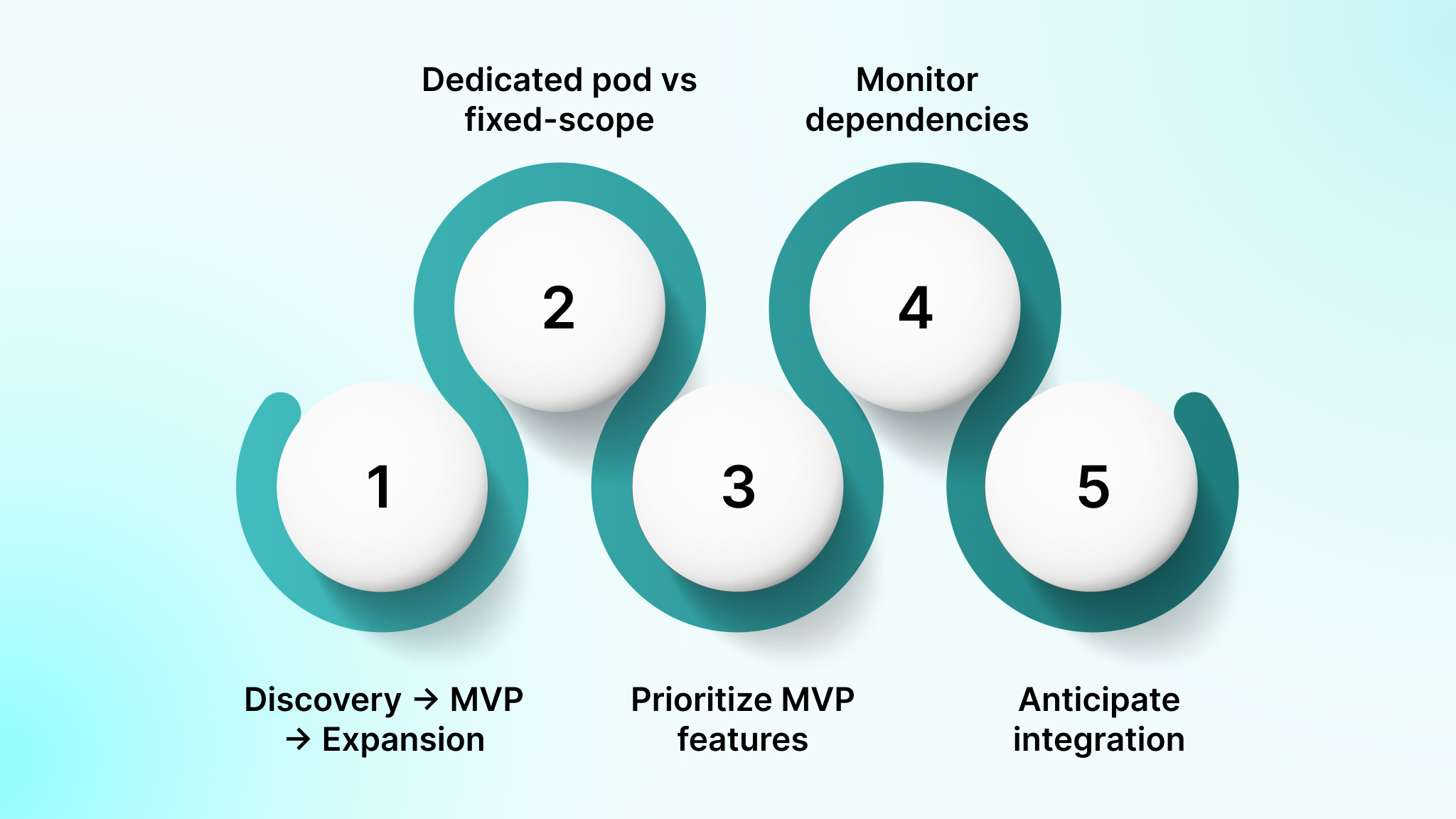
Your CRM project follows a structured timeline to reduce risk and maximize ROI. Understanding phases, engagement models, and common slowdowns helps you plan efficiently and set realistic expectations.
How to plan your CRM timeline effectively:
- Discovery → MVP → Expansion: Discovery typically takes 2-4 weeks, MVP delivery 8-16 weeks, and expansion runs continuously based on usage, feedback, and evolving workflows.
- Dedicated pod vs fixed-scope: A dedicated pod supports rolling releases every 2-3 weeks, while fixed-scope projects follow milestone-based delivery with limited flexibility once development begins.
- Prioritize MVP features: Shipping core workflows first shortens time to value and prevents timeline drag caused by low-impact features entering early development cycles.
- Monitor dependencies and approvals: CRM projects slow down when stakeholder sign-offs, ERP access, or third-party API approvals aren’t aligned with sprint schedules.
- Anticipate integration and compliance hurdles: ERP, billing, and compliance reviews often add 2-6 weeks if not planned upfront; buffering time and automating tests reduces delays.
With timelines and models in mind, let’s explore the main challenges you’ll face, from budget overruns to adoption.
Also Read: 7 Benefits of Augmented Reality in Education With Examples
Key Challenges in Custom CRM Projects
Building a custom CRM comes with predictable hurdles that can affect budget, adoption, and long-term ROI. Identifying these early lets you prevent costly mistakes and maximize value.
CRM challenges include:
- Budget overruns: Costs escalate when requirements grow mid-build, integrations expand unexpectedly, or underestimated engineering effort compounds across sprints, testing cycles, and rework.
- Scope creep: CRM projects accumulate edge cases, exceptions, and stakeholder-specific requests that gradually alter workflows, inflate timelines, and dilute the original system focus.
- Adoption failure: Users disengage when daily tasks take longer than expected, workflows feel rigid, or the CRM does not align with how sales, support, or operations teams actually work.
- Security & compliance: Gaps in permission design, audit traceability, or data handling introduce regulatory risk, internal access issues, and potential failures during compliance reviews.
- Maintenance burden: Highly customized logic, tightly coupled modules, and undocumented workflows increase long-term support effort, making routine updates slower, riskier, and more expensive.
Preventing these outcomes requires CRM platforms to be engineered as core business systems, exactly how DEVtrust approaches CRM development.
How DEVtrust Engineers CRM Platforms for Your Business?
CRM development fails when systems are treated as feature builds instead of operational infrastructure. Poor data models, brittle integrations, weak access control, and untested workflows quickly surface once real users and live data enter the system.
DEVtrust builds CRM platforms as long-term business systems, engineered around data integrity, security, and real operational usage. Every CRM is designed from the ground up to support complex workflows, regulated environments, and growing business scale without relying on rigid platforms or fragile middleware.
How DEVtrust delivers custom CRM app development:
- Architecture-First CRM Engineering: Explicit data models, lifecycle rules, and tenant-aware designs that prevent schema rewrites as reporting, billing, or workflows evolve
- Security & Compliance by Design: Role-based access control, encrypted data handling, audit logging, and cloud architectures aligned with SOC 2 and PCI-DSS requirements
- API-First & Event-Driven Integrations: Reliable, real-time data flows across ERP, billing, payments, analytics, and FinTech systems without batch sync failures
- AI Embedded Into CRM Workflows: Predictive lead scoring, workflow intelligence, and operational analytics built on clean, structured CRM data; not black-box automation
- Production-Grade QA & Performance Validation: Load testing, permission validation, data integrity checks, and failure scenarios tested before deployment
- Web & Mobile CRM Experiences: Role-specific dashboards and mobile-ready interfaces designed for adoption by sales, operations, and leadership teams
By treating CRM platforms as core operational infrastructure, DEVtrust helps organizations build systems that remain secure, adaptable, and performant as teams, data, and complexity grow. Here’s how we helped a client achieve their goals:
WaLead, a B2B sales CRM, needed automated LinkedIn lead management. DEVtrust built a Chrome extension, custom Kanban pipelines, and drag-and-drop tools, reducing data redundancy by 60%, boosting collaboration by 60%, and improving workspace data accessibility by 50%.
Conclusion
Custom CRM development is about building a system that mirrors how your business actually operates. When data models, workflows, permissions, and integrations are poorly engineered, the CRM becomes a source of friction, leading to low adoption, security exposure, and escalating long-term costs.
DEVtrust approaches CRM development as core operational infrastructure. Each platform is engineered with architecture-first design, secure data handling, compliance-ready access control, and workflow logic aligned to real sales, operations, and leadership usage. This ensures the CRM remains stable, extensible, and reliable as teams, data volumes, and business complexity grow.
If you’re planning to build or modernize a CRM platform that supports scale without breaking under operational pressure, contact our team to explore how DEVtrust can help.
Frequestly Asked Questions
Related Articles
Custom Software Development
Enterprise Application Integration: What It Is and How It Works

Custom Software Development
Nearshore Software Development in 2026: What It Is and How It Works
Custom Software Development