With users spending an average of 3.5 hours daily on apps, it’s clear that mobile applications are central to driving engagement and growth. But for CTOs, founders, and product leaders, the challenge lies in turning this screen time into meaningful business impact.
Building a business mobile app that stands out and aligns with your strategic goals can be overwhelming. Many businesses struggle to balance user experience, scalability, and security while ensuring the app integrates seamlessly with existing systems.
This blog will guide you through the essential steps to overcome these hurdles. We’ll cover everything from understanding your user needs to tackling complex integrations and ensuring your app is built for long-term success.
Quick Recap
- Business Growth through Mobile Apps: Mobile apps are essential for driving engagement, streamlining operations, and offering real-time access to business functions, which directly contribute to business growth.
- Strategic Planning for Success: Successful app development starts with clear goal-setting, understanding user needs, and selecting the right tech stack to align with business objectives.
- Seamless Integration with Business Systems: Custom-built mobile apps integrate smoothly with existing systems like ERP and CRM, improving workflows and enhancing operational efficiency.
- Focus on Security and Scalability: Ensuring your app is secure, compliant with industry standards, and scalable is critical for protecting data and supporting long-term business growth.
- Continuous Post-Launch Optimization: Regular updates, real-time performance monitoring, and iterative improvements help maintain app relevance and ensure it performs well as user needs evolve.
What is Mobile Business App Development?
Mobile business app development is the process of designing, building, and launching applications customized to business needs. Business mobile apps are custom-built to achieve a company’s strategic goals, whether it’s managing inventory, automating sales, or improving HR processes.
These apps can be used by internal teams for productivity or external customers for engagement, often integrated with existing systems like ERPs and CRMs. Mobile apps provide quick, on-the-go access to important business functions, making them essential in a mobile-first world.
Types of Business Mobile Apps
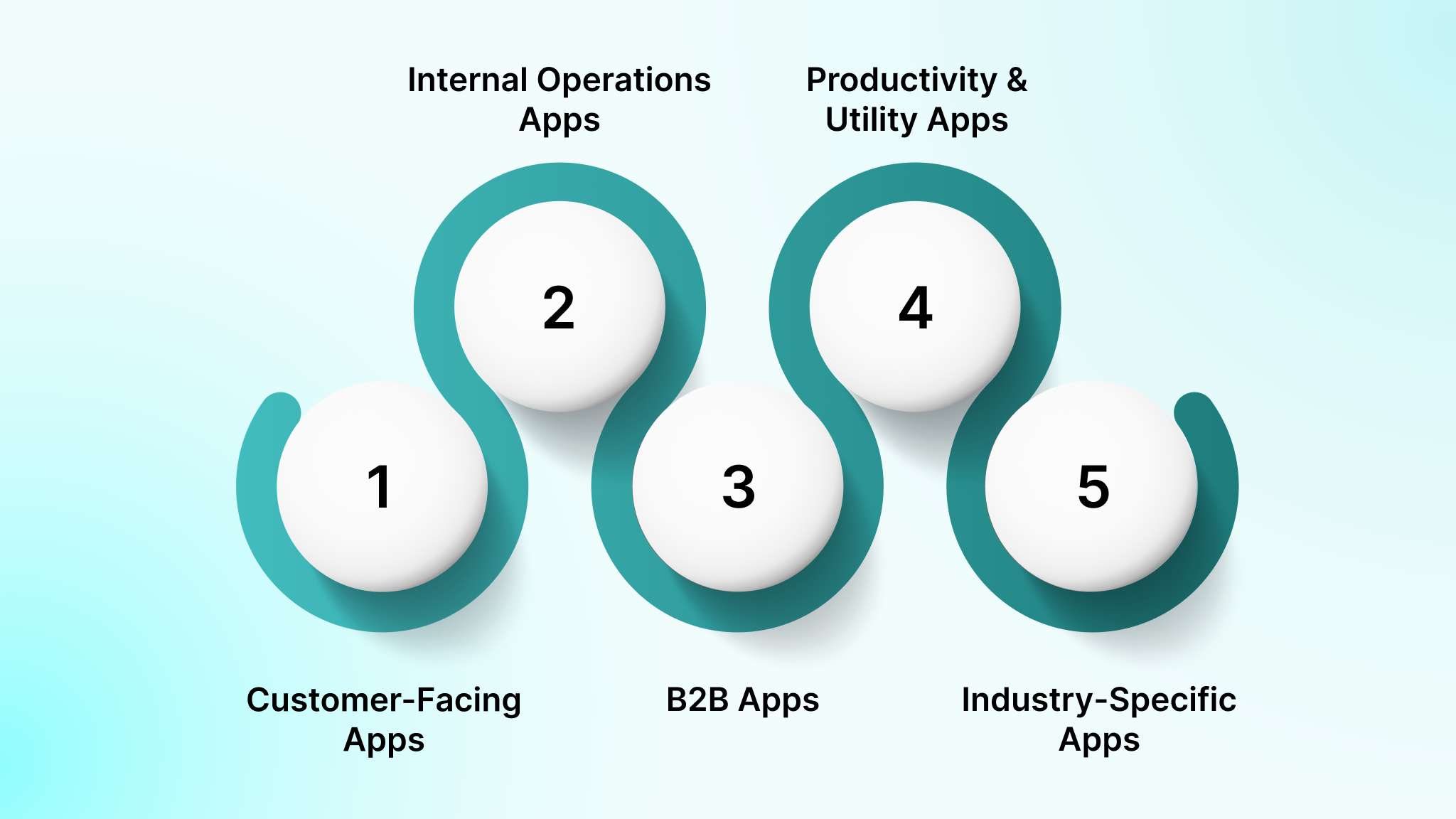
- Customer-Facing Apps: Enhance user engagement and drive sales through effortless interactions. Examples: e-commerce, loyalty, and service booking apps.
- Internal Operations Apps: Streamline workflows, boost productivity, and improve communication. Examples: HR management, task management, and collaboration apps.
- B2B Apps: Improve business transactions with custom experiences, analytics, and communication. Examples: vendor management and client support apps.
- Productivity & Utility Apps: Solve specific tasks like finance management, scheduling, and documentation. Examples: accounting, project management, and time tracking apps.
- Industry-Specific Apps: Address unique sector challenges while ensuring compliance and functionality. Examples: telemedicine and real estate listing platforms.
Mobile business apps play a crucial role in modernizing business operations by enabling real-time mobile access to systems and data for employees, partners, and customers.
So, why should your business consider investing in mobile app development? Let’s explore the benefits that can drive your success.
Why Your Businesses Should Invest in Mobile Application Development
Mobile applications have developed from optional add-ons to essential business tools. For startups and enterprises alike, apps provide growth, engagement, and long-term value when built with intent.
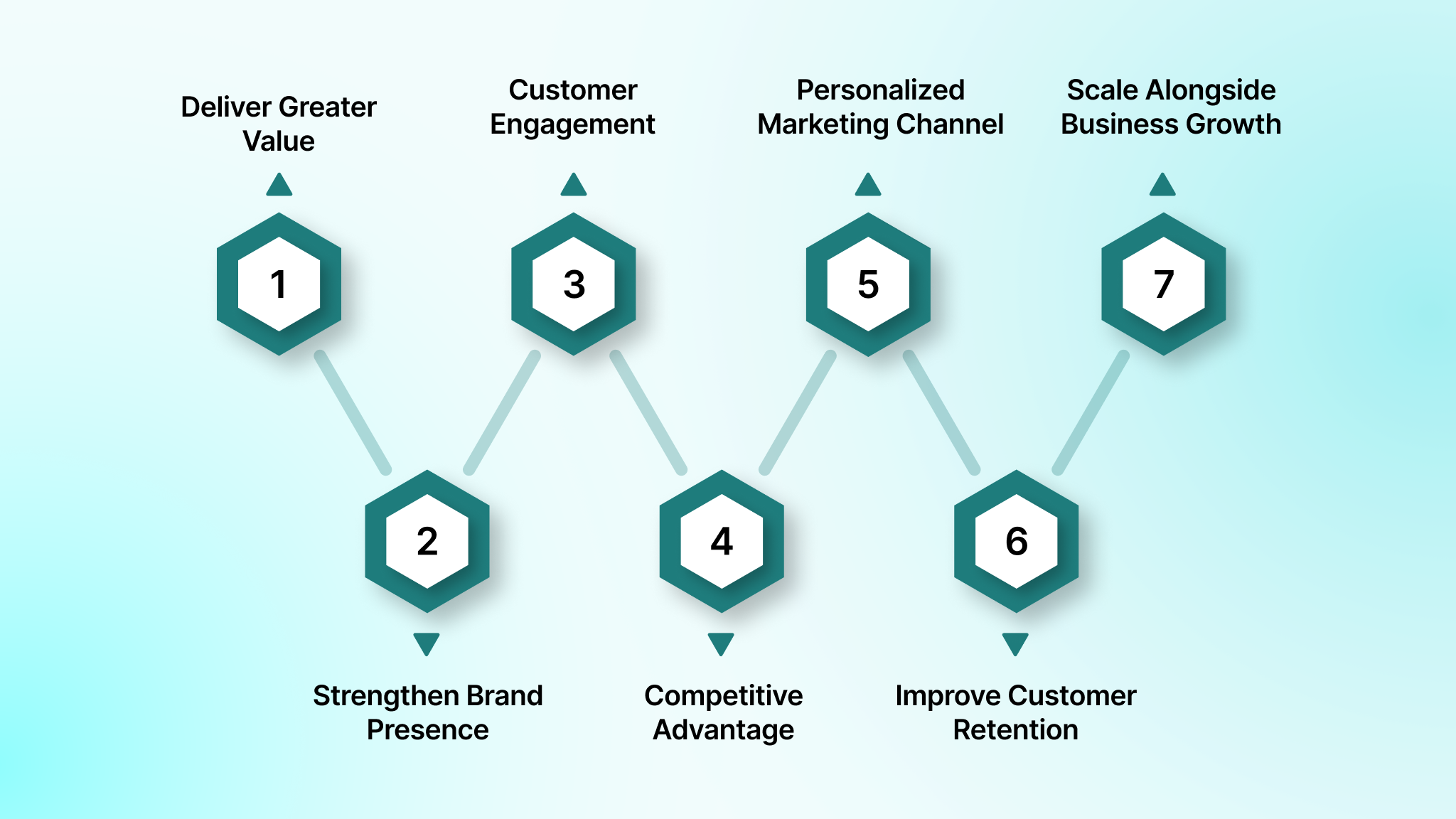
1. Deliver Greater Value to Customers
Mobile apps simplify how customers discover, purchase, and interact with products or services across touchpoints. Features such as real-time availability, order tracking, and personalized recommendations enhance the everyday customer experience.
2. Strengthen Brand Presence and Recall
A branded mobile app creates a consistent and immersive brand touchpoint on the user’s device. Usage data further helps refine branding strategies and align messaging with actual customer behavior.
3. Increase Customer Engagement
Mobile apps enable frequent, meaningful interactions through personalized content and timely updates. User segmentation allows businesses to tailor experiences based on behavior, preferences, or location.
4. Gain a Competitive Advantage
Mobile apps outperform traditional websites in speed, responsiveness, and usability. They enable instant communication and smoother journeys across the entire customer lifecycle. Businesses with well-executed apps often stand out in increasingly crowded digital markets.
5. Create a Personalized Marketing Channel
Apps give you a direct channel to authenticated users, plus first-party behavioural data (with consent). That improves targeting for lifecycle messaging like renewals, upgrades, retention nudges, and support deflection.
6. Improve Customer Retention
Personalized experiences increase relevance, trust, and long-term loyalty. Regular engagement strengthens relationships and boosts customer lifetime value over time.
7. Scale Alongside Business Growth
Mobile apps can expand with new users, features, and markets without disruption. Cloud infrastructure and modular development simplify updates and enhancements. Scalable architecture reduces operational strain while supporting long-term business expansion.
These benefits make mobile application development a strategic investment that helps businesses stay customer-centric, competitive, and prepared for long-term digital growth.
Understanding the types of apps is key to making the right decision. Let’s break down the differences between native, hybrid, and progressive web apps.
Native Apps vs. Hybrid Apps vs. Progressive Web Apps (PWAs): What’s the Difference?
When building a mobile app, one of the first decisions is whether to go with Native, Hybrid, or Progressive Web Apps (PWAs). Each approach has its strengths and trade-offs based on cost, development time, user experience, and platform compatibility.
| App Type | What It Is | Best For | Tradeoffs |
|---|---|---|---|
| Native | Built separately for iOS (Swift) and Android (Kotlin) | Highest performance, best device access, complex UX | Higher cost, two codebases |
| Cross-Platform Native | One codebase renders native UI (React Native/Flutter) | Faster delivery with near-native UX | Some platform-specific work is still needed |
| Hybrid WebView | Web app inside a native wrapper (Ionic/Cordova) | Simple apps, quick internal tools | Weaker performance for complex UI, WebView limits |
| PWA | Web app that behaves like an app (installable) | Fast rollout, lighter budgets, broad reach | Limited device APIs vs native, distribution differs |
If you need maximum performance, advanced device features, or complex UX, native is often the best fit. If speed-to-market and shared development matter more (with near-native UX), cross-platform native frameworks like React Native or Flutter are strong defaults. If your primary goal is fast distribution and broad reach on limited budgets, a PWA can work well, especially for content or commerce experiences with limited device API requirements.
Also Read: Hybrid Mobile App Development: A Beginner’s Guide
Once you know the app types, it’s time to decide whether to build from the ground up or go with an off-the-shelf solution.
Buy an Off-the-Shelf App vs. Create an App from Scratch
Off-the-shelf apps can work when your workflows are standard and you’re willing to adapt your process to the product. Custom builds make sense when the app is tied to differentiation, core operations, or integration-heavy systems.
Use this decision filter:
- Choose off-the-shelf when: Your workflows match common patterns, you need something live quickly, integrations are minimal, and long-term differentiation isn’t dependent on the app.
- Choose custom when: You need deep ERP/CRM integration, custom roles and approvals, industry-specific compliance, offline workflows, or a UX that directly impacts retention and revenue.
- Best of both worlds (compose): Many modern builds combine proven components (auth, payments, analytics, notifications) with custom workflows. You ship faster without inheriting rigid vendor constraints.
Rather than choosing between “build vs. buy,” the question should be “customize vs. compose.”
At DEVtrust, we help businesses build custom mobile apps using modular components, ensuring scalability, security, and efficiency without the hassle of complex vendor management. Let’s create an app that’s perfectly tailored to your business needs and growth. Contact us today.
Now that you’ve decided how to build, let’s take a closer look at the essential features you should prioritize for your business app.
Key Features to Prioritize When Building a Business Mobile App
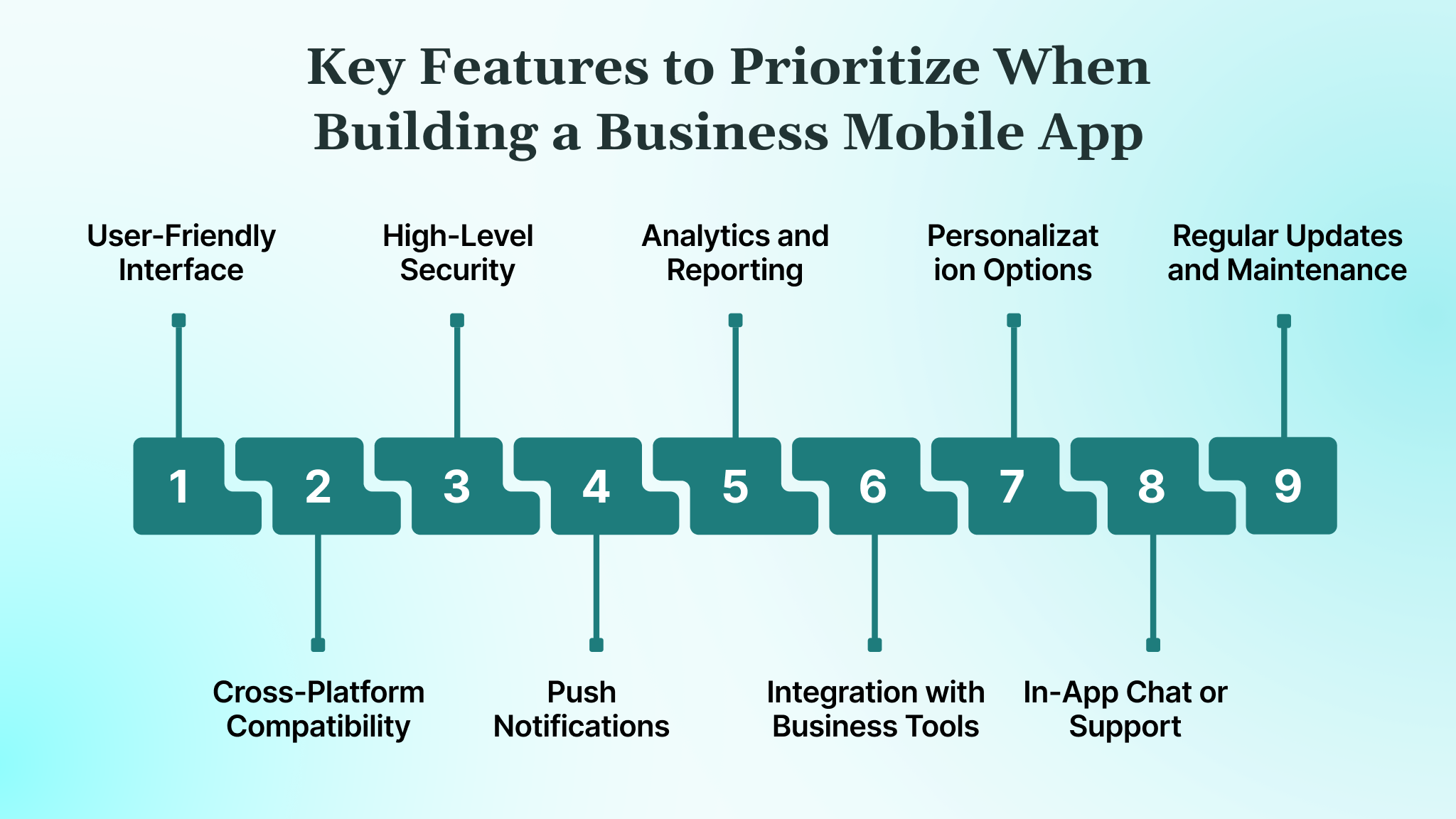
Turning your app idea into a successful product starts with thorough research and careful planning. Before jumping into development, it’s essential to understand your market, customer needs, and competitors. Here are the key features you should prioritize when developing your business mobile app:
- User-Friendly Interface: Your app should be intuitive and easy to navigate. Focus on clean layouts and quick access to core functions to minimize complexity.
- Cross-Platform Compatibility: Ensure your app works seamlessly across Android, iOS, and web platforms to broaden your audience and improve user satisfaction.
- High-Level Security: Implement reliable security features, including multi-factor authentication, end-to-end encryption, and secure APIs to protect sensitive business data.
- Push Notifications: Use timely push notifications to engage users with promotions, updates, and essential alerts, driving user interaction.
- Analytics and Reporting: Integrate analytics to track user behavior and app performance. These insights are crucial for refining strategies and improving the app’s impact.
- Integration with Business Tools: Easily connect your app to CRM, ERP, and other business systems. This improves operations and enhances productivity.
- Personalization Options: Offer users a tailored experience through saved preferences, recommendations, and customized content, driving deeper engagement.
- In-App Chat or Support: Incorporate chatbots or live support to provide instant help, improving user trust and satisfaction.
- Regular Updates and Maintenance: Launching the app is just the start. Consistent updates, bug fixes, and feature improvements keep the app relevant and users engaged.
Considering these features ensures your app meets your business goals and delivers an engaging user experience.
Recommended Reads: Complete Guide to SaaS Development Process: From Concept to Launch
With the key features in mind, it’s time to outline the step-by-step process that will guide you through building a successful business mobile app.
A Step-by-Step Guide to Building High-Impact Mobile Applications
Building a mobile application that succeeds in the market requires strategic planning, technical precision, and continuous refinement. Below is a streamlined roadmap to reduce risk, maximize value, and ship an app that users actually adopt.
Step 1: Define Outcomes And KPIs
Start by defining the measurable outcomes the app must drive for users and for the business. Set KPIs early so every scope, design, and engineering decision ties back to impact rather than opinions.
Step 2: Map Users, Roles, And Workflows
Identify who will use the app, what permissions they require, and the workflows they follow. Clear role and workflow mapping prevents access-control issues and UX misalignment, especially in B2B and regulated environments.
Step 3: Decide Build Type
Choose between native, cross-platform, or PWA development based on performance needs, device access, offline requirements, budget, and long-term maintenance considerations.
Step 4: Scope The MVP Around One Primary Job-To-Be-Done
Define the single most important job the app must help users complete. Build the MVP tightly around this job and defer secondary features to avoid scope creep and delayed launches.
Step 5: Design Information Architecture And UX Flows
Translate the core job into clear screens, navigation, and task flows. Prioritize intuitive onboarding, minimal friction, and fast task completion for real-world usage.
Step 6: Define Backend, Data Model, And Integration Plan
Establish backend architecture, APIs, data models, and environments early. Plan all integrations upfront—payments, analytics, identity, third-party systems—since data mapping and vendor constraints often drive complexity more than UI.
Step 7: Build With Security Baselines From Day One
Embed security from the start, including authentication, role-based access control, encryption, audit logging, and secure configuration management. Compliance and privacy requirements should be part of the definition of done.
Step 8: Test For Performance, Devices, Usability, And Security
Continuously test across devices, operating systems, and usage scenarios. Validate usability with real users, run performance tests for peak loads, and conduct security testing before release.
Step 9: Launch, Monitor, Iterate, Then Scale
Launch with analytics, monitoring, and logging in place. Track KPIs, user behaviour, and system health, then iterate based on real data. Scale features, platforms, and integrations only after proving adoption and ROI.
Also Read: Comprehensive Mobile Banking App Development Guide
Finally, let’s explore the technology stack that powers high-performance apps, from front-end frameworks to back-end systems and everything in between.
Mobile App Development Tech Stack
Building a mobile app requires selecting the right technologies to ensure performance, scalability, and a seamless user experience. Below is a breakdown of the essential tools for modern enterprise mobile application development.
| Category | Technology | Description |
| 1. Frontend Frameworks | Swift | Native iOS development language; fast, secure, and optimized for Apple devices. |
| Kotlin | Official Android development language; concise, modern, and fully supported. | |
| React Native | JavaScript framework by Meta for building cross-platform apps with reusable components for iOS & Android. | |
| Flutter | Google’s UI toolkit using Dart; known for expressive UIs and fast development cycles. | |
| .NET MAUI (C#) | Microsoft’s Xamarin successor for cross-platform native apps. | |
| 2. Backend Technologies | Node.js | JavaScript runtime for building fast, scalable server-side apps, ideal for real-time features. |
| Python (Django/Flask) | Fast prototyping and APIs; great for machine learning and data-driven applications. | |
| Ruby on Rails | Convention-based framework for rapid app development, focused on simplicity. | |
| Java / Spring Boot | Secure, scalable backend technology for building robust enterprise applications. | |
| PHP (Laravel) | Lightweight, powerful backend with extensive community support for quick app development. | |
| 3. Database Technologies | Firebase Realtime Database/Firestore | Google’s NoSQL database for real-time data syncing, perfect for mobile apps. |
| MongoDB | Scalable, flexible NoSQL database for handling dynamic data and app requirements. | |
| PostgreSQL | Open-source relational database, ideal for structured data and complex queries. | |
| MySQL | Popular SQL database for transactional and e-commerce apps. | |
| Realm | Mobile-first NoSQL database for offline-first mobile apps with local storage. | |
| 4. Cloud Infrastructure & DevOps | AWS (Amazon Web Services) | Industry-leading cloud platform with extensive services for compute and storage needs. |
| Google Cloud Platform (GCP) | Scalable cloud infrastructure with deep integration into Firebase and other Google tools. | |
| Microsoft Azure | Powerful cloud platform for enterprise apps, mobile services, and DevOps needs. | |
| Docker & Kubernetes | Containerization and orchestration tools for scalable backend infrastructure. | |
| GitHub Actions / GitLab CI / Jenkins | Continuous integration tools for automating builds, tests, and deployment workflows. | |
| 5. Security & Authentication | OAuth 2.0 | Authorization protocol to securely manage access to user data across apps. |
| JWT (JSON Web Tokens) | Token-based, secure user authentication method for APIs and mobile apps. | |
| Firebase Authentication | Easy-to-implement authentication service supporting email, phone, and social logins. | |
| SSL/TLS Encryption | Standard protocol for encrypting data during transmission to maintain security. | |
| 6. Testing & Quality Assurance | Appium | Cross-platform mobile app automation tool for functional testing. |
| JUnit / Espresso | Unit testing frameworks for Android apps to ensure quality and performance. | |
| XCTest | Testing framework for native iOS apps, ensuring functionality and reliability. | |
| BrowserStack / Firebase Test Lab | Cloud-based device testing to ensure compatibility across various OS versions and screen sizes. | |
| 7. Analytics & Monitoring | Firebase Analytics | Provides detailed insights into user behavior, events, and app performance. |
| Mixpanel / Amplitude | Advanced analytics tools for tracking user behavior, funnels, and retention. | |
| Crashlytics | Real-time crash reporting tool by Firebase, essential for identifying issues quickly. | |
| Sentry / LogRocket | Monitoring tools for error tracking, session replay, and performance diagnostics. |
Selecting the right tech stack is crucial to building high-performing mobile applications that deliver real value to your users. Each tool in this stack plays a vital role in ensuring that your app is secure, scalable, and optimized for long-term success.
Build and Scale Your Business with DEVtrust’s Tailor-Made Mobile Apps
At DEVtrust, we specialize in delivering custom mobile app solutions that integrate advanced technologies, including smart contract capabilities, cloud infrastructure, and cross-platform frameworks. Here’s how we can help:
- Cross-Platform Development: We use frameworks such as React Native and Flutter to deliver smooth experiences across iOS and Android.
- Scalable Architecture: Our back-end systems are optimized for high-volume transactions and real-time data sync, ensuring performance even at scale.
- Secure & Compliant: We build with data encryption, multi-factor authentication (MFA), and compliance with industry standards to safeguard user data.
- Cloud Integration: Seamless integrations with AWS, Google Cloud, and Microsoft Azure to ensure your app’s scalability and reliability.
- User-Centric Design: We create intuitive, responsive UIs focused on ease of use, accessibility, and performance across all devices.
- Continuous Support & Optimization: Post-launch, we provide maintenance, optimization, and real-time performance monitoring to keep your app running smoothly.With DEVtrust, you get a mobile app built to last, designed with the right balance of security, scalability, and user experience to keep your business moving forward.
Conclusion
Building a successful mobile app for your business requires a blend of strategic planning, scalable technology, and user-centric design. By using the right frameworks, integrating secure backend systems, and ensuring seamless performance, you can create a tool that drives engagement and supports long-term growth.
This intentional approach ensures your app becomes a valuable asset that supports long-term growth and customer retention, and helps you refine your strategy.
At DEVtrust, we specialize in crafting business mobile apps that are tailored to your exact needs. We deliver comprehensive solutions that are designed to scale with your business. Contact us today to get started!
Frequestly Asked Questions
Related Articles
Mobile App Development
App Development Cost in Singapore 2026: Complete Guide
Mobile App Development
Blockchain App Development Explained for Product and Tech Leaders

Mobile App Development